SQL query tuning for multiple database platforms
Optimize SQL queries across multiple platforms from a single user interface. DB Optimizer helps DBAs and developers tune SQL code like a professional.
- Simplify SQL tuning across all major DBMS platforms from a single interface
- Tune SQL like a professional with automated performance optimization suggestions
- Resolve SQL query issues using visual SQL tuning diagrams
- Pinpoint problem SQL through database profiling and wait-time analysis
- Load-test alternative SQL queries in a simulated production environment
Supported database platforms
Tool capabilities
Optimize SQL queries across multiple platforms from one interface
Simplified tuning across all major DBMS platforms
Tune poorly performing SQL code across all major relational database platforms (Microsoft SQL Server, Oracle Database, IBM Db2 LUW, SAP Sybase ASE, PostgreSQL, Pivotal Greenplum and Amazon Redshift) from one common graphical interface. Reduce the need for training and simplify collaboration across teams in your organization.
Tune SQL like a professional
The SQL Tuning Wizard automatically suggests solutions and provides key context while tuning SQL code. Color-coded index analysis shows used, unused or missing indexes along with recommendations for optimal performance.
Visual SQL query resolution
Unique in the industry, Visual SQL Tuning (VST) diagrams turn textual SQL code into graphical SQL diagrams. This approach helps DBAs and developers understand the impact of SQL statements on the database, displaying indexes, constraints and joins.
Instant detection of performance bottlenecks
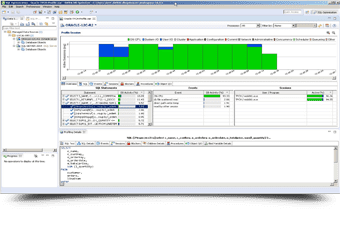
Database profiling provides a graphical view of wait-time analysis, making it easy to pinpoint the SQL causing poor performance. Continuous profiling tracks the entire data source over a configurable time range, with explain plans and reporting.
Simulated production environments
Load testing verifies the performance of existing and alternative SQL queries against the database. Configure queries to run in parallel and see how they behave in a simulated production environment — with no risk of testing in actual production.
See the tool in action
Explore DB Optimizer through an interactive product tour
See how DB Optimizer turns complex SQL queries into clear visual diagrams, automated recommendations and measurable performance improvements — with help from an experienced specialist.
Purchasing
Buying and demos
Request a quote
Custom per-user pricing
Pricing depends on the number of users (workstation license) and available volume discounts. Contact us for a regional quote tailored to your team.
Request a quoteLive demo
Free, with a specialist
See DB Optimizer in action with an experienced specialist — ask questions and see how it fits into your SQL environment.
Request a demoTry DB Optimizer for free
Become a pro at tuning the performance of SQL Server and other leading database platforms. Get started today.